POS programım açılmıyor ne yapmalıyız? (EN)
If the POS screen constantly rotates and you cannot log in, this process is used to clear the cookies of the browser you are using. If your browser data is full, problems such as system slowdown, changes not being reflected instantly, etc. may occur. You can follow the steps below or get help from the facility's IT department.
Cache Clearing Video Link: YouTube
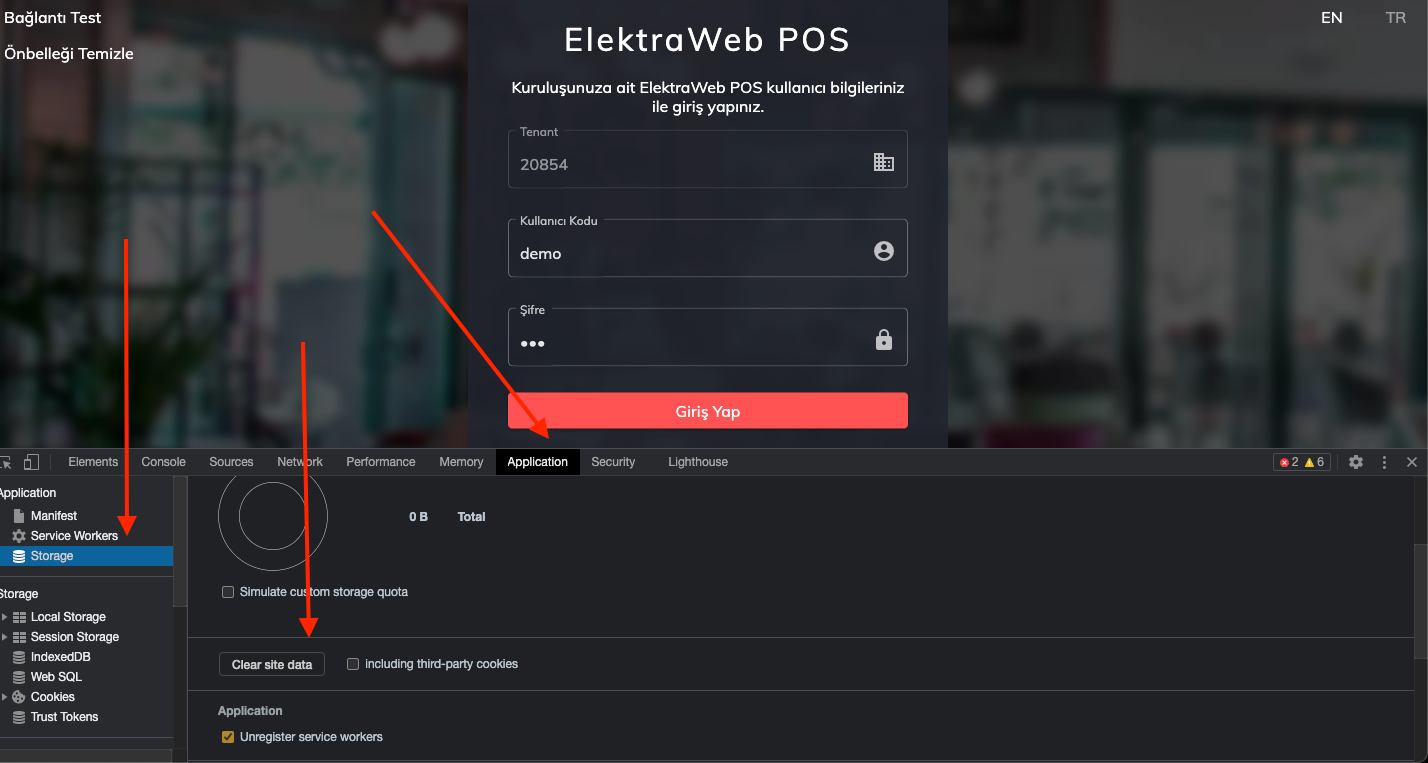
- Press the F12 key.
- From the tabs in the opened console, enter the Application tab.
- Click on the 'Clear Site Data' button just below the graph that appears on the screen that opens.
- Right click on the Refresh button at the top left and select Empty Cache and Full Reload.

If the above process is insufficient, Local Storage, Session Storage and Cookies fields must also be cleared.
- Bu konuda detaylı bilgiye https://yardim.elektraweb.com/pos/ ulaşabilirsiniz.